
Programming
My Experia X1 mods
15/11/2009 09:57
I have purchased a used X1 a couple of months ago, mainly for GPS use. I do have to say that this must be the phone with the most rom-mods in existence nowadays. After a lot of try and testing, I have found myself one of the best -in my opinion- custom rom. It sure has some minor glitches, but you will love its speed and features. Read more and get it from here.
I strongly recommend to become a member it’s a great community forum afaic the wm devices.
Almost forgot. READ how to flash the rom before you try anything! You might end up with an expensive brick in your hands...
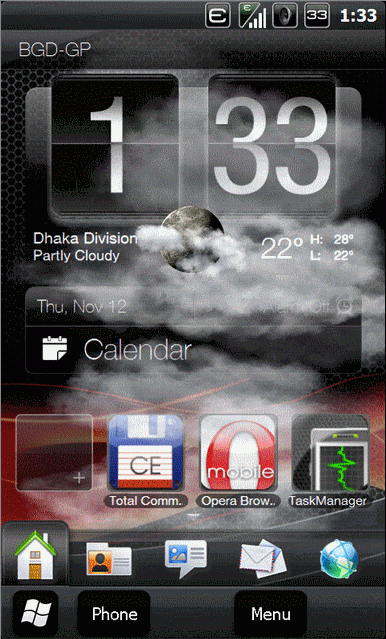
I strongly recommend to become a member it’s a great community forum afaic the wm devices.
Almost forgot. READ how to flash the rom before you try anything! You might end up with an expensive brick in your hands...
Booting up OSX off an external HDD
16/04/2008 00:03
I have some people asking about how did I manage to make an external HDD to boot any PC in the house with OSX (see March 2008 news archive). I have a list of 'to-do' things ready for you, so you can do this easily too. So here goes:
1. Partition your external HDD with MBR option ticked through Disk Utility from Kalyway's 10.5.1 DVD.
2. Install Kallyway’s 10.5.1 Dvd with MBR EFI and no specific kernel (top 2 options blank)
3. After setting up the machine info – reg name etc you should be able to boot up to OSX 10.5.1
4. Install Kallyway’s 10.5 .2 combo update and DO NOT reboot until updating kernels too! Choose the patched one.
5. After restart, boot with –v –s and hope everything goes ok
6. When up again, install NVinstaller V.41.pkg – This gave my 8600GTS QE/CI.
7. Reboot. You are all set.
PS: Be sure you have removed all internal HDDs from your machine so that you won't accidentaly format another one. I'd recommend you execute the procedure only with the external HDD attached and the DVD that you will install Kalyway's release from it.
Good Luck!
Whacker
1. Partition your external HDD with MBR option ticked through Disk Utility from Kalyway's 10.5.1 DVD.
2. Install Kallyway’s 10.5.1 Dvd with MBR EFI and no specific kernel (top 2 options blank)
3. After setting up the machine info – reg name etc you should be able to boot up to OSX 10.5.1
4. Install Kallyway’s 10.5 .2 combo update and DO NOT reboot until updating kernels too! Choose the patched one.
5. After restart, boot with –v –s and hope everything goes ok
6. When up again, install NVinstaller V.41.pkg – This gave my 8600GTS QE/CI.
7. Reboot. You are all set.
PS: Be sure you have removed all internal HDDs from your machine so that you won't accidentaly format another one. I'd recommend you execute the procedure only with the external HDD attached and the DVD that you will install Kalyway's release from it.
Good Luck!
Whacker
Booting up alien OS's
18/03/2008 01:32
Ok, I'm sure most of you you might have seen this over a thousand times, and I'm talking about a PC running OSX, but I promise, this is different. A nice 80GB WD running OSX and being able to boot up *almost* every core duo pc around the house, welp. That's something you should see
Feel free to comment the video, I'd love to reply to any questions on how I did it.
Whacker
Feel free to comment the video, I'd love to reply to any questions on how I did it.
Whacker
Compiling MAME under VISTA
10/01/2007 08:36
I found this article from Aaron's site quite intriguing; given the fact that I haven't yet installed Vista (even though I have the RC1 package for sometime now for testing purposes from my company IT dept.). The most interesting part though imho is the way that people respond to the inability of Vista to build a proper MAME binary without a bunch of hocus-pocus tricks and treats... How many of the fellow programmers at mamedev find Aero nice and who dislike it? Click the above link... Interesting read. 